Knowledge base
Manuals and knowledge, ordered in chapters.
A knowledge base turns a data tableStructured content such as team, events, products or references: entries with the same fixed fields that can appear on several pages – often with a detail page per entry. into a manual: numbered chapters, a sidebar with search, breadcrumbs and previous/next – in the design of every kitIn KLXM Studio, the package of design and building blocks for a website: layout, colours, fonts and the matching blocks. A kit can be adapted or switched – the content stays., accessibilityDesigning and building websites so that everyone can use them – including people with visual, hearing or motor impairments, with a screen reader or by keyboard only.w3.org (opens in a new tab) and usable without JavaScript.
Screenshots
Overview, chapter and phone.
Screenshots from a test installation with fictitious content – click to enlarge.
-
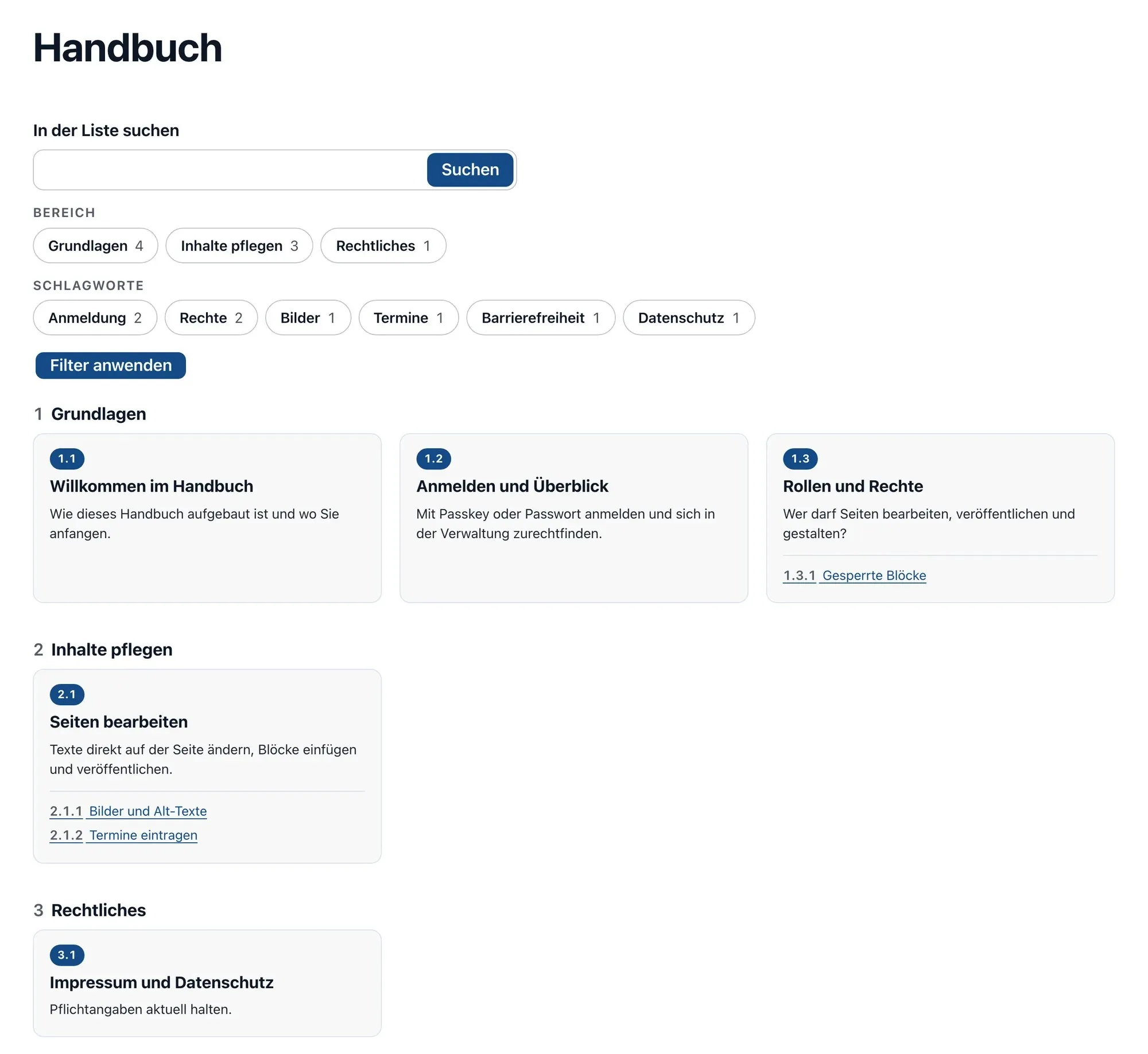
Start page of the knowledge base: search, filters by area and tags, chapters as cards with number and subchapters. -
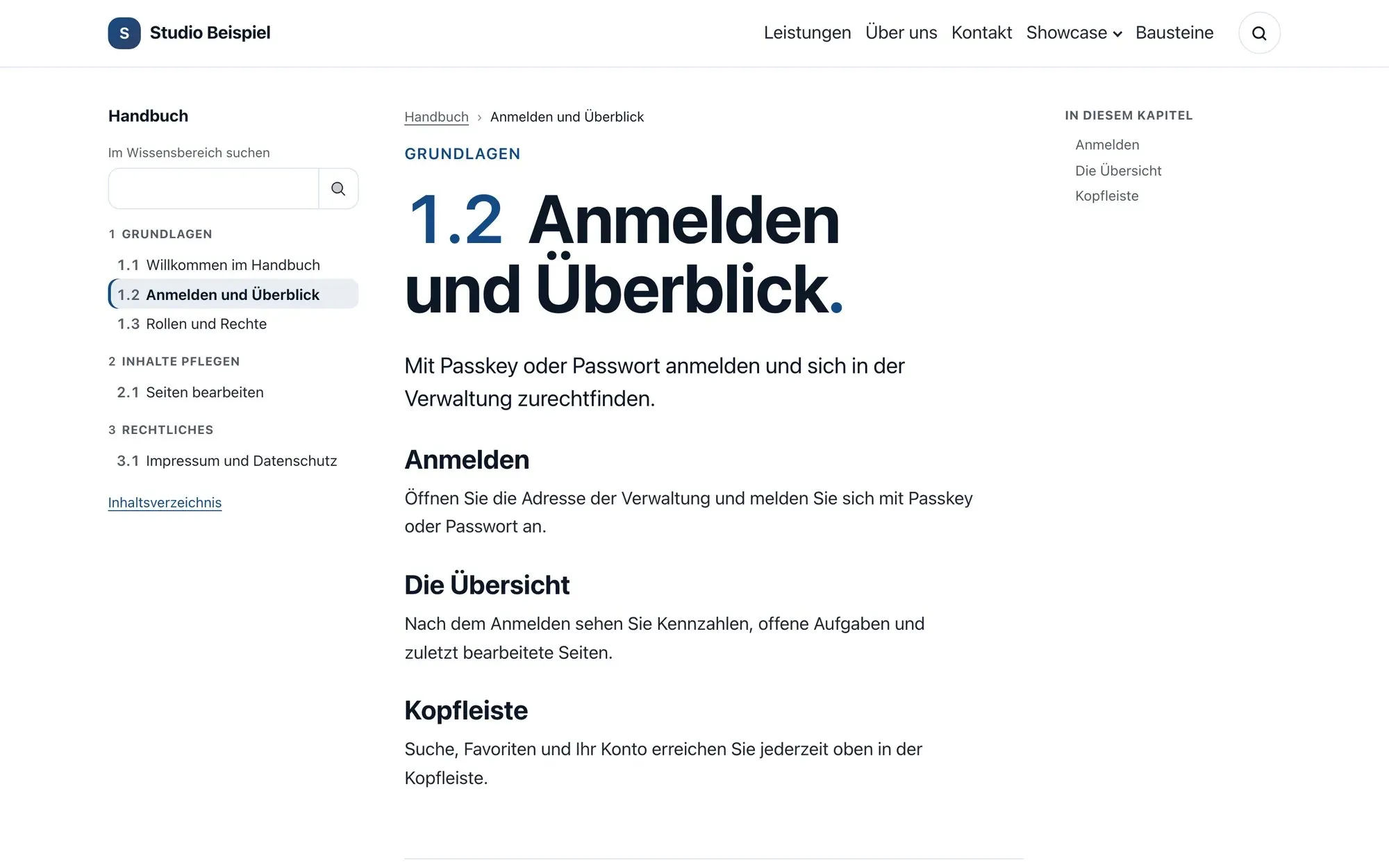
A chapter in the “Manual” layout: chapter tree on the left, sections on the right. -
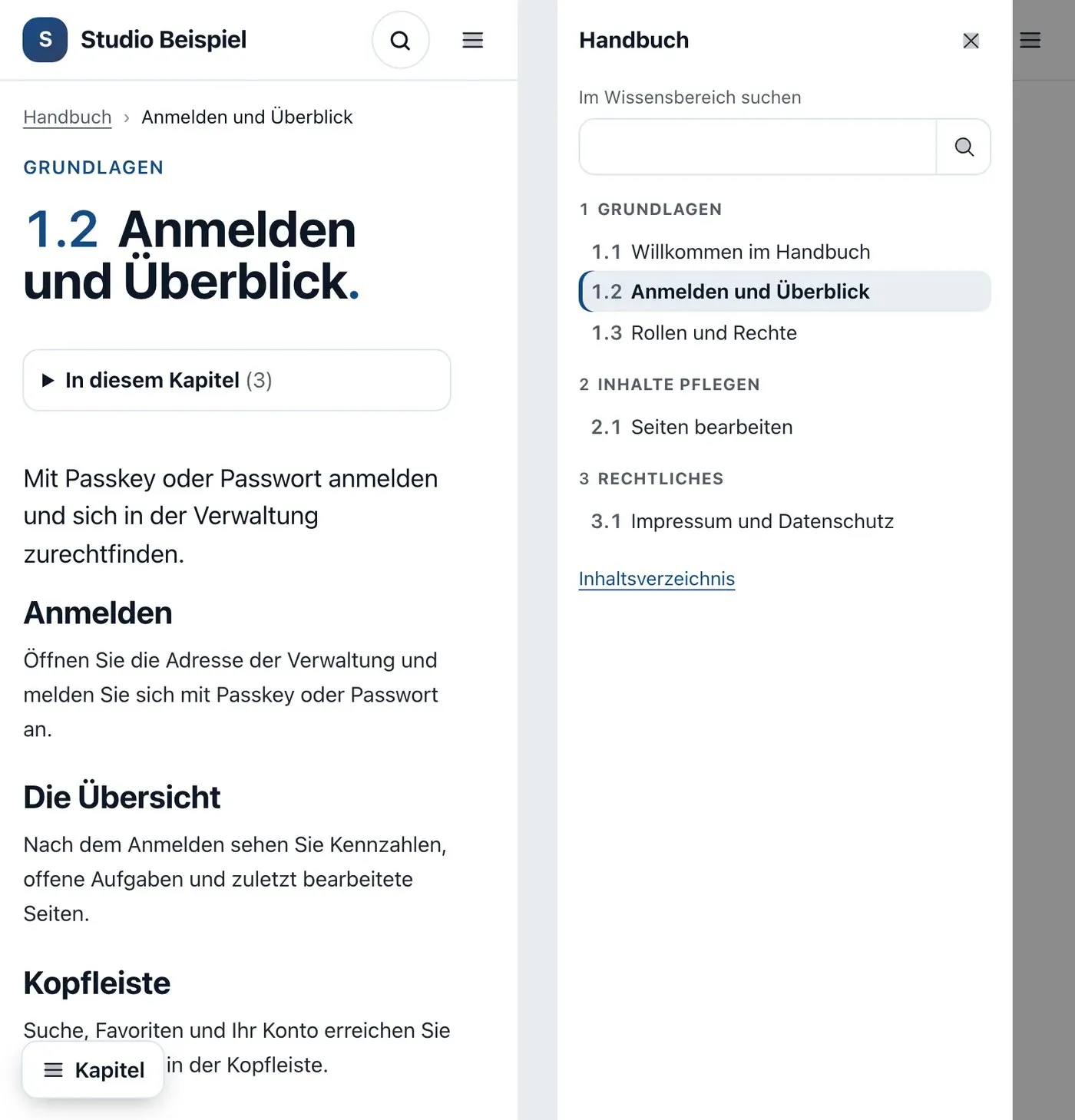
On a phone: chapter and chapter menu as a drawer.
Chapters
Built like a manual.
-
Numbered chapter tree
Chapters with parent chapters across any number of levels. Numbers such as 2.1.3 are generated automatically and can be overridden; areas structure the whole.
-
Five layouts
Classic, compact, focus with drawer, manual with sections on the right and compact manual – selectable per knowledge base. On a phone, “Chapters” opens the chapter menu.
-
Search with excerpts
Search shows the sentence with the search term highlighted. Filters by area and tag allow several options per filter; the state is kept in the address.
-
Start page with cards
The overview shows the chapters as a table of contents or as cards with image, number, teaser and the first subchapters.
-
Chapters in the menu
If you like, chapters appear as sub-items of the overview page in the header and mobile menu – one or two levels, with or without numbers. This also works for other data tables with their own address.
-
Glossary and related chapters
Chapters link terms from the website glossary and related chapters. A term’s page can show in which chapters and pages it appears.
Editing & technology
Structured, maintained, transferable.
-
Structured data
Every chapter is an Article in a collection – with its chain of parent chapters, number, area, tags, glossary terms and author. The overview is a CollectionPage listing the chapters in reading order (JSON-LDFormat for structured data in a page’s code: it tells search engines in machine-readable form what the page is about – such as organisation, event or article (vocabulary of schema.org).developers.google.com (opens in a new tab)).
-
Moving from pages
One command turns a branch of pages into a knowledge base – with a dry run and revert. Page tree, menu state and the header image come along; old addresses redirect.
-
Link chapters
Pages that should stay pages appear as chapters of the type “link” – numbered in the sidebar, table of contents, search and previous/next.
-
Maintained like all data
Permissions, approval, versions, search, REST APIWidely used form of programming interface over HTTP: content is retrieved, created or changed via addresses, usually in JSON format.en.wikipedia.org (opens in a new tab) and sharing in the network as with every data table; plus author and “last reviewed” per chapter. Chapters may also contain data lists.
-
Accessible
Skip link, landmarks, current chapter announced to screen readers and focus handling in the drawer – usable without JavaScript as well. Styled only with the kit’s colours and fonts.
Table kinds
Do more with data.
Knowledge bases are data tables with a view of their own – like the address book and the calendar.
Contact
Talk to KLXM Crossmedia.
A demo, use in your project or an extension tailored to your needs – get in touch. We answer personally.
Am Schürmannshütt 40g
47441 Moers
Germany
- Phone
- +49 2841 889998-0
- info@klxm.de
- Website
- klxm.de (opens in a new tab)